
DeepSeek can look exceptionally inexpensive on a model-pricing table. But the price per million input tokens tells only part of the story.
The real cost of a production workload depends on the selected DeepSeek model, prompt length, generated output, reasoning tokens, conversation history, retries and the number of requests your application sends.
A chatbot with short answers can cost almost nothing per conversation. A reasoning agent that repeatedly processes long documents, includes a large tool schema and generates extensive analysis can use significantly more tokens—even when the advertised rate remains low.
JarvisClaw provides DeepSeek alongside models from OpenAI, Anthropic, Google and other providers through one OpenAI-compatible API gateway. Developers can select a specific DeepSeek model or use smart routing when model choice should depend on cost, quality or task requirements.
This guide explains the current DeepSeek pricing structure on JarvisClaw, calculates practical usage examples and identifies the costs that are frequently overlooked.
DeepSeek Models Available Through JarvisClaw
At the time of review, JarvisClaw’s model documentation lists three DeepSeek options:
| Model ID | Context Window | Best For |
|---|---|---|
deepseek/deepseek-chat | 1,048K tokens | Chat, extraction, classification and coding |
deepseek/deepseek-reasoner | 1,048K tokens | Multi-step reasoning, analysis and coding |
deepseek/deepseek-v4-pro | 1,048K tokens | Higher-end reasoning and coding workloads |
JarvisClaw notes that GET /v1/models is the authoritative source because models can be added, changed or retired. Its published model table is a snapshot rather than a permanent catalogue.
The large context window does not mean that every request should send hundreds of thousands of tokens. Context capacity tells you what the model can accept. Billing is based on what the application actually sends and receives.
DeepSeek API Pricing on JarvisClaw
JarvisClaw derives chat-model prices from a ratio system:
Input price = model ratio × $2 per 1 million tokens

Output price = input price × model completion ratio
Using the current documented ratios, the reference rates are:
| DeepSeek Model | Input Cost per 1M Tokens | Output Cost per 1M Tokens |
|---|---|---|
deepseek/deepseek-chat | $0.20 | $0.40 |
deepseek/deepseek-reasoner | $0.20 | $0.40 |
deepseek/deepseek-v4-pro | $0.435 | $0.87 |
The documentation identifies both DeepSeek Chat and DeepSeek Reasoner with a 0.1 input ratio and a 2× completion multiplier. DeepSeek V4 Pro uses a 0.2175 ratio with the same 2× completion multiplier.
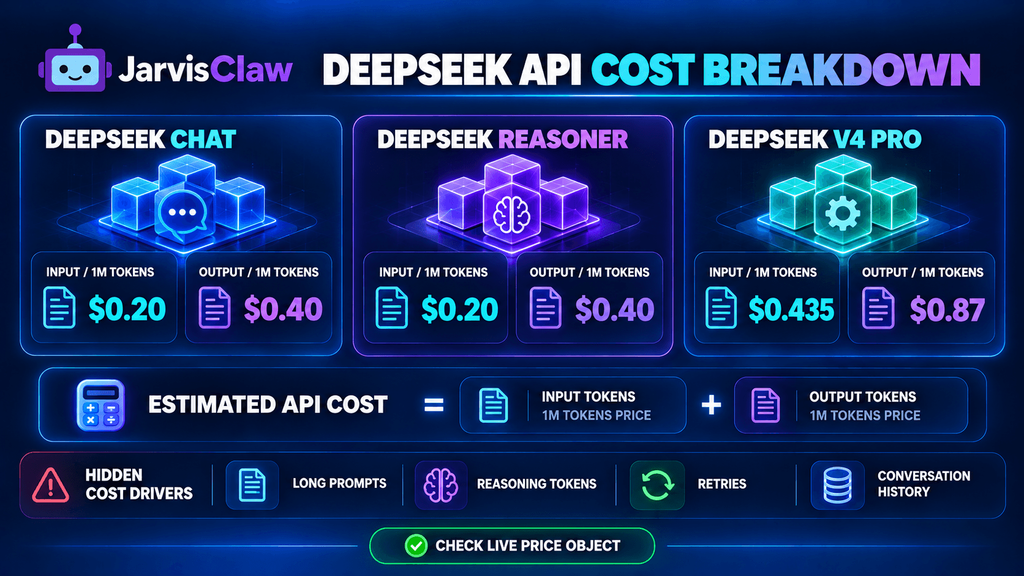
These figures should be treated as reference rates. JarvisClaw recommends checking its live pricing page and reading the price object returned with a completed response for the exact settled amount.
How to Calculate the Cost of a DeepSeek Request
The basic formula is:
Request cost =
(input tokens ÷ 1,000,000 × input price)
+
(output tokens ÷ 1,000,000 × output price)
For example, a request to DeepSeek Chat with 10,000 input tokens and 1,000 output tokens would cost:
Input:  10,000 ÷ 1,000,000 × $0.20 = $0.0020
Output:  1,000 ÷ 1,000,000 × $0.40 = $0.0004

Estimated total: $0.0024
The output is more expensive per token, but a long prompt may still account for most of the bill.
This becomes important in retrieval-augmented generation, code analysis and multi-turn agents. An application may produce only 500 output tokens while repeatedly sending 50,000 tokens of documents, instructions and previous messages.
Practical DeepSeek Cost Examples
The following estimates use the current JarvisClaw reference rates.
| Workload | Input Tokens | Output Tokens | DeepSeek Chat / Reasoner | DeepSeek V4 Pro |
|---|---|---|---|---|
| Short support reply | 1,000 | 300 | $0.00032 | $0.00070 |
| Blog outline | 5,000 | 1,000 | $0.00140 | $0.00305 |
| Document analysis | 50,000 | 2,000 | $0.01080 | $0.02349 |
| Large code review | 100,000 | 5,000 | $0.02200 | $0.04785 |
| Long research task | 250,000 | 10,000 | $0.05400 | $0.11745 |
These are token-cost estimates, not guaranteed invoices. They do not include repeated attempts, additional tool calls or application-level services such as web search.
At 100,000 short customer-support requests with 1,000 input and 300 output tokens each, the estimated DeepSeek Chat model cost would be:
100,000 × $0.00032 = $32However, if the application sends a 10,000-token knowledge base with every request, the estimated cost rises to approximately:
100,000 × $0.00212 = $212The model did not become more expensive. The application architecture did.
The Hidden Costs Behind Cheap Token Pricing
Repeated Conversation History
Many chat applications resend the complete conversation with every turn.
A five-turn conversation is therefore not billed as five isolated prompts. Later requests may contain the previous questions and answers again.
Use conversation summarization, message trimming or external memory when older messages no longer need to remain in the active prompt.
Large System Prompts and Tool Schemas
An agent may send thousands of tokens of instructions and tool definitions before the user’s message is counted.
If the same 8,000-token system prompt is included in one million requests, it represents eight billion input tokens. At $0.20 per million input tokens, that portion alone would be approximately $1,600.
Remove duplicated instructions and expose only the tools required for the current task.
Reasoning Output
Reasoning models may consume more completion tokens than the final visible answer suggests.
JarvisClaw’s OpenAI-compatible usage fields report prompt_tokens, completion_tokens and total_tokens. Its documentation states that completion usage includes thinking or reasoning for supported providers.
Do not estimate cost solely by counting the words displayed to the user. Read the API’s usage and price fields.
Retries and Failed Outputs
A response that fails your schema validation may still have used tokens.
If the application automatically retries three times, one user action can create four billable completions. Track first-attempt success rate and avoid unlimited retry loops.
Excessive Maximum Output
A high max_tokens value does not necessarily mean the full allowance will be billed, but it permits unnecessarily long responses.
Use a realistic maximum for each task. Classification may need fewer than 50 output tokens, while a report may need several thousand.
Using One Model for Every Task
DeepSeek Reasoner or V4 Pro may be appropriate for difficult analysis, but simple tagging, extraction and routing may not need the same model.
The inexpensive request is the one matched to the task—not automatically the one using the lowest advertised rate.
DeepSeek Chat vs Reasoner vs V4 Pro
Choose deepseek/deepseek-chat for:
- Customer-support responses
- Structured extraction
- Classification
- Summarization
- Standard coding assistance
- High-volume application tasks
Choose deepseek/deepseek-reasoner when:
- The task requires multi-step analysis
- Intermediate reasoning improves reliability
- The request involves complex code or planning
- You can tolerate longer responses and variable latency
Consider deepseek/deepseek-v4-pro when:
- Higher-quality reasoning is worth a higher token rate
- The task is difficult enough to justify model escalation
- Output quality matters more than minimizing cost
- You have evaluated it against Chat and Reasoner on your own data
Do not make the decision from model names alone. Build an evaluation set with representative prompts, expected outputs and acceptance criteria.
A less expensive model that requires frequent retries can cost more than a higher-priced model that succeeds on the first attempt.
Calling DeepSeek Through an OpenAI-Compatible API
JarvisClaw uses this base URL:
https://api.jarvisclaw.ai/v1The standard chat endpoint is:
POST /v1/chat/completionsA Python request can use the official OpenAI client structure:
from openai import OpenAIclient = OpenAI( api_key="sk-your-api-key", base_url="https://api.jarvisclaw.ai/v1")response = client.chat.completions.create( model="deepseek/deepseek-chat", messages=[ { "role": "system", "content": "Return a concise JSON response." }, { "role": "user", "content": "Classify this support ticket by topic and urgency." } ], max_tokens=200, temperature=0.2)print(response.choices[0].message.content)print(response.usage)JarvisClaw documents support for streaming, function calling and structured output through its OpenAI-compatible Chat Completions API.
This makes it possible to test DeepSeek without maintaining a separate provider-specific request format.
How to Control DeepSeek API Spending
Start with four measurements:
- Average input tokens per request
- Average output tokens per request
- First-attempt success rate
- Cost per successful task
“Cost per successful task” is more useful than cost per request.
A model can appear inexpensive while generating outputs that require human corrections, retries or a second model pass.
Practical controls include:
- Set task-specific output limits.
- Remove irrelevant conversation history.
- Shorten tool descriptions and system prompts.
- Use structured outputs to reduce formatting retries.
- Reject duplicate requests with idempotency keys.
- Log usage and the returned
priceobject. - Route simple tasks to cheaper models.
- Escalate only low-confidence or complex requests.
- Test long-context prompts before production.
- Apply per-user and per-agent spending limits.
JarvisClaw also offers smart-routing aliases such as auto, auto/eco and auto/premium. The auto/eco route is intended to select the cheapest capable model when minimizing cost is more important than forcing one provider.
Use Real Workloads, Not Pricing Tables Alone
DeepSeek’s 2026 pricing can make it a strong option for chat, coding, reasoning and high-volume automation. But a low rate per million tokens does not guarantee a low production bill.
The major cost drivers are often hidden in the application:
- Long prompts
- Repeated history
- Oversized retrieval results
- Reasoning output
- Tool schemas
- Retries
- Poor model selection
Begin with one representative workflow. Measure its actual prompt tokens, completion tokens, success rate and settled price. Then compare DeepSeek Chat, Reasoner and V4 Pro using the same test set.
JarvisClaw lets developers access these models through one OpenAI-compatible endpoint while retaining the option to compare other providers or use smart routing.
Explore the current JarvisClaw API pricing, check the live model list and review the API documentation before finalizing a production budget.
FAQ
How much does the DeepSeek API cost in 2026?
On the current JarvisClaw reference table, DeepSeek Chat and DeepSeek Reasoner cost approximately $0.20 per million input tokens and $0.40 per million output tokens. DeepSeek V4 Pro is approximately $0.435 for input and $0.87 for output. Check live pricing before deployment.
Which DeepSeek model is the cheapest?
DeepSeek Chat and DeepSeek Reasoner currently share the same documented reference token rates on JarvisClaw. Actual total cost depends on how many input, output and reasoning tokens the workload consumes.
Is DeepSeek Reasoner more expensive than DeepSeek Chat?
Their listed per-token rates are currently the same, but Reasoner may generate or consume more completion tokens during complex tasks. This can make the complete request more expensive.
How do I calculate DeepSeek API cost?
Multiply input tokens by the input rate, multiply output tokens by the output rate, and add the two results. Divide token counts by one million before applying the rates.
Does a large context window cost more automatically?
No. You pay for tokens actually processed, not the maximum supported context window. A larger context becomes expensive only when the application sends more content.
Can I use the OpenAI SDK with DeepSeek?
Yes. JarvisClaw exposes DeepSeek through an OpenAI-compatible endpoint. Change the base URL, use your JarvisClaw key and specify a supported DeepSeek model ID.
How can I reduce DeepSeek API costs?
Shorten prompts, trim conversation history, limit retrieval results, set realistic output caps, reduce retries and route simple tasks to the least expensive model that meets your quality target.
Where can I find the exact charge for a request?
Review the usage fields for token counts and the JarvisClaw response’s price object for the exact settled charge.