
Most developers do not struggle to make their first AI API call. The real difficulty begins after the prototype works.
A production application may need one model for reasoning, another for low-cost classification, a search API for current information, speech tools for audio, blockchain data for transactions, and fallback providers when a service is unavailable.
Integrating each service separately creates a predictable mess: more API keys, different request formats, separate billing accounts, duplicated error handling, and provider-specific code throughout the application.
An AI-focused API gateway solves a different problem from a traditional network gateway. It gives applications and autonomous agents one access layer for models, data, tools, routing, and payments.
JarvisClaw combines an OpenAI-compatible model gateway with a searchable API Marketplace, smart routing, MCP connectivity, and pay-per-call infrastructure. Developers can use the same platform to access language models and practical services such as prediction-market data, web search, audio processing, video generation, crypto intelligence, blockchain RPC, DeFi data, and isolated code execution.
What Should an AI API Gateway Tool Actually Do?
Many products described as API gateways only forward requests. That may be enough for internal microservices, but AI applications require more.
A useful AI gateway should help developers:
- Access models from multiple providers through one request format.
- Switch models without rewriting the application.
- Route a task by cost, speed, or required capability.
- Discover non-model APIs that let an agent take action.
- See pricing before executing a paid service.
- Apply spending limits at the infrastructure layer.
- Use streaming and tool calling where supported.
- Add fallback logic without maintaining multiple SDKs.
- Connect agent clients through standards such as MCP.
The hidden cost in a multi-provider AI stack is rarely the first integration. It is the maintenance that follows. Providers change model names, retire versions, introduce new endpoints, and return different errors. A gateway creates a stable application-facing interface while the services behind it continue to evolve.
Start With One OpenAI-Compatible Endpoint
JarvisClaw exposes the following base URL:
https://api.jarvisclaw.ai/v1Its chat endpoint uses the familiar OpenAI-compatible path:
POST /v1/chat/completionsThat means an existing OpenAI SDK integration can usually be adapted by changing the API key, base URL, and model name. JarvisClaw’s documentation describes this as a drop-in approach: keep the client structure and point it at the gateway.
A basic Python example looks like this:
from openai import OpenAIclient = OpenAI( api_key="sk-your-api-key", base_url="https://api.jarvisclaw.ai/v1")response = client.chat.completions.create( model="auto", messages=[ { "role": "user", "content": "Summarize this support ticket and suggest the next action." } ])print(response.choices[0].message.content)The important detail is model="auto".
Instead of permanently assigning every request to a single provider, the application can let the routing layer select an appropriate model. Developers who require deterministic behavior can still provide a specific provider/model-name.
JarvisClaw also documents an OpenAI-compatible Responses API at POST /v1/responses, including support for streaming, function calling and multi-turn continuation.
Use Routing Profiles Instead of Hard-Coding Every Decision
“Best model” is not a useful universal setting. The best choice depends on the job.
A customer-facing reasoning task may justify a premium model. Product tagging may need the cheapest capable option. A development environment may prioritize a free model, while a web-research workflow needs search with citations.
JarvisClaw currently documents routing aliases including:
autofor balancing quality, cost, and speed.auto/premiumfor higher-quality results.auto/ecofor the lowest-cost capable option.auto/freefor free supported models.auto/imagefor image generation.auto/videofor video generation.auto/ttsfor text-to-speech.auto/musicfor music generation.auto/searchfor web search with citations.
The platform’s live model catalogue should be queried through GET /v1/models, because models can be added or retired. At the time reviewed, the documentation listed 72 models across 12 providers plus nine routing aliases.
The practical pattern is simple:
def choose_route(task_type, importance): if importance == "high": return "auto/premium" if task_type == "classification": return "auto/eco" if task_type == "research": return "auto/search" return "auto"This prevents provider names from spreading across your business logic. The application describes what it needs; routing policy decides how to supply it.
Go Beyond Models With an API Marketplace
A language model can decide what should happen next, but it cannot obtain current market prices, execute isolated code, query a blockchain, or generate a voice call without tools.
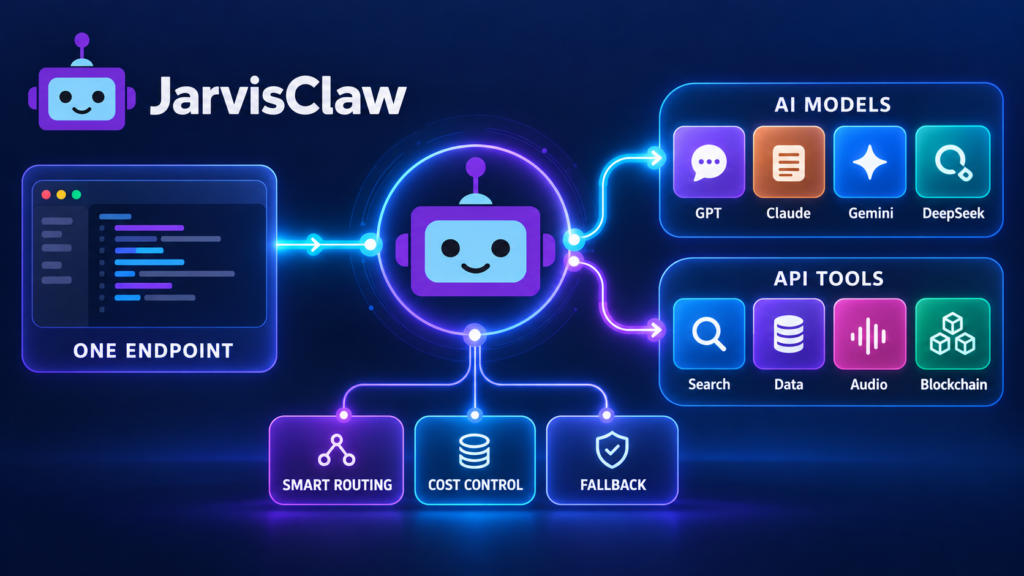
This is where a model-only gateway becomes limiting.
JarvisClaw’s API Marketplace brings action-oriented services into the same developer environment. Its listed categories include prediction markets, audio and speech, image and video creation, web search, crypto intelligence, DEX trading, multi-chain RPC, DeFi data, market prices, phone services, and sandboxed compute. Marketplace services use a pay-per-call model instead of requiring a separate subscription for every capability.
Consider an automated crypto research agent. It may need to:
- Search current news.
- retrieve token and wallet data.
- compare prediction-market prices.
- analyze the information with a reasoning model.
- produce a concise report.
Without a gateway, that workflow could require four providers, four authentication systems, and four billing relationships. With a common infrastructure layer, the agent can discover and call services from one workflow.
The overlooked benefit is not simply having “more APIs.” It is reducing the time between discovering a new requirement and testing it in a product.
Add MCP When the Client Is an AI Agent
Application code is not the only way to use an API gateway.
Claude Code, Cursor, and other MCP-compatible clients can connect to JarvisClaw through:
https://api.jarvisclaw.ai/mcpThe MCP layer exposes structured tools that an agent can inspect and use. This is useful when the required service is not known before the task begins.
For example, an agent can be instructed:
Find an API that can retrieve prediction-market prices.
Show the available endpoints, required parameters, and estimated cost.
Do not execute a paid call until the cost is confirmed.
That prompt separates discovery from execution. It allows the agent to compare options before spending money—a small operational detail that becomes important once agents run without constant supervision.
JarvisClaw documents model calls as one of the functions available through its MCP connection.
Control Costs Before the Request Runs
A dashboard that reports yesterday’s spending is useful, but it does not prevent an agent from making an expensive call today.
Production systems need controls before execution:
- Maximum cost per call
- Daily or workflow-level budgets
- Approved model and tool lists
- Premium-route approval rules
- Development and production keys
- Logs for tool, model, latency, and exact charge
- Limited-balance wallets for autonomous agents
JarvisClaw supports conventional API-key authentication and machine-native x402 payments. Its documentation describes x402 settlement in USDC, including support for agents that authorize paid calls through a wallet.
For most teams, API keys are the easiest starting point. Wallet-based payment becomes useful when autonomous software must purchase API calls without opening provider accounts or managing subscriptions.
A Practical Gateway Architecture
A clean production implementation can use four layers:
- Application layer: Your product, workflow, or agent defines the task.
- Policy layer: Your code selects a fixed model or routing profile and enforces a budget.
- Gateway layer: JarvisClaw provides authentication, common endpoints, routing, and access to marketplace services.
- Provider layer: Models and specialized APIs execute the request.
Keep one important fallback in your own application: define what happens when a request times out, returns invalid output, or exceeds the permitted price.
Do not retry indefinitely. Use a small retry limit, log the reason, and select a controlled fallback route. For sensitive workflows, validate the response schema before allowing the next tool call.
When API Gateway Tools Deliver the Most Value
An AI API gateway is especially useful when:
- Your application needs multiple model providers.
- Model availability changes frequently.
- Different tasks have different cost and quality requirements.
- Agents require search, data, media, or blockchain tools.
- You want to reduce credential and billing sprawl.
- You need pay-per-call access for occasional services.
- Claude, Cursor, or another MCP client must use the same capabilities.
- You want to test new providers without rewriting core application code.
A gateway is less valuable when an application uses one stable endpoint, has no routing needs, and is unlikely to add other capabilities. The goal is not to introduce another layer for its own sake. The goal is to remove repeated integrations and centralize decisions that otherwise become scattered across the codebase.
Build Around Capabilities, Not Provider Names
The best API gateway tools do more than shorten an endpoint list. They give developers a stable way to combine models, real-time data, external actions, payments, and agent access.
JarvisClaw provides an OpenAI-compatible base URL for model requests, smart-routing aliases for common performance goals, an API Marketplace for real-world capabilities, and MCP access for agent clients.
Start with one controlled workflow. Change the base URL, test a fixed model, compare it with auto, record cost and latency, and then add one marketplace tool. This produces useful evidence before the gateway becomes part of a larger system.
Explore the JarvisClaw API Marketplace and review the official documentation before connecting a production workload.
FAQ
What is an AI API gateway?
An AI API gateway provides a common access layer for multiple AI models and related services. It can centralize authentication, routing, billing, monitoring, and tool discovery.
Is JarvisClaw compatible with the OpenAI SDK?
Yes. OpenAI-compatible clients can use the JarvisClaw base URL and API key while retaining the familiar request structure.
What is the JarvisClaw base URL?
https://api.jarvisclaw.ai/v1Can I choose a specific model?
Yes. Use the full supported model identifier when exact provider selection matters. Use a smart-routing alias such as auto, auto/premium, or auto/eco when the gateway should select a suitable model.
How do I retrieve the current model list?
Use:
GET /v1/modelsThe live endpoint is preferable to hard-coding a catalogue because model availability changes.
Does the gateway only provide language models?
No. The Marketplace includes specialized APIs for search, market data, prediction markets, media creation, audio, blockchain infrastructure, DeFi data, crypto intelligence, telephony, and compute.
Can an AI agent use JarvisClaw through MCP?
Yes. MCP-compatible clients can connect to the JarvisClaw MCP endpoint to discover and use supported tools.
How can I prevent an agent from overspending?
Set per-call and workflow budgets, restrict approved tools, use limited credentials or wallets, require approval for premium calls, and log the exact cost returned for each request.