
Google has expanded Gemini 4 Argon to developers, enterprises, and eligible Gemini subscribers worldwide, moving the model beyond its earlier limited-access phase.
For developers, the important news is not simply that another frontier model has arrived. Gemini 4 Argon is designed for long-running, multi-step work across software engineering, enterprise research, mathematics, science, computer use, and cybersecurity.
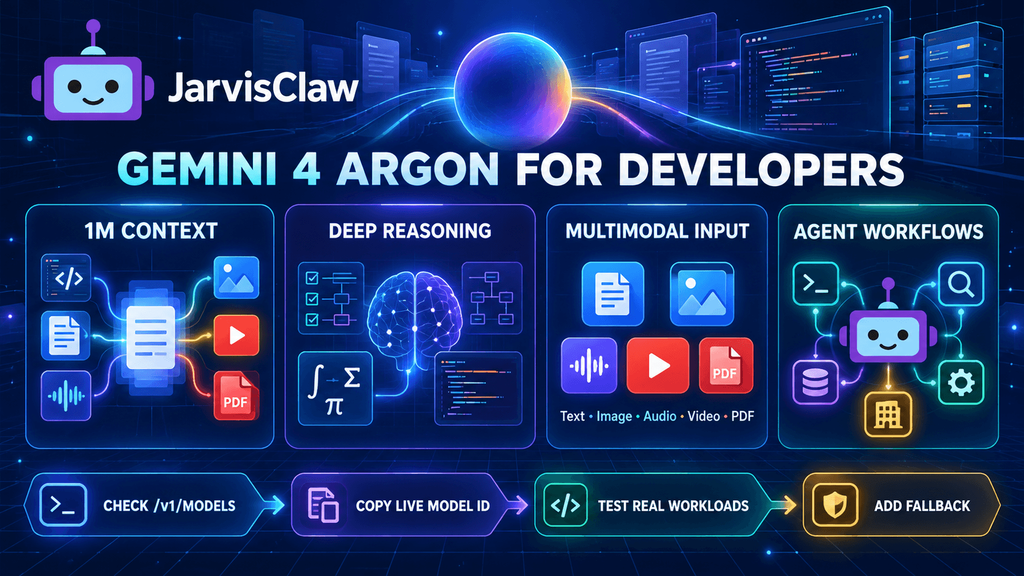
It also arrives with a significantly different operating profile from a normal chatbot model: a unified context window of approximately one million tokens, support for multimodal inputs, extended reasoning controls, function calling, code execution, structured outputs, search grounding, and long-output workflows.
That combination makes Argon particularly relevant to developers building AI agents rather than simple question-and-answer applications.
What Is Gemini 4 Argon?
Gemini 4 Argon is Google’s flagship reasoning model for complex professional and agentic workloads.
According to Google’s current model documentation, the production model ID is:
gemini-4-argonThe model accepts:
- Text
- Images
- Audio
- Video
- PDF documents
Its output is text, and Google documents a unified input-output context limit of 1,048,576 tokens. Standard synchronous output can reach 65,536 tokens, while supported long-decode workflows may extend significantly further.
The model also supports capabilities such as:
- Function calling
- Structured outputs
- Code execution
- Search grounding
- Google Maps grounding
- URL context
- File search
- Computer use in preview
- Low, medium, and high thinking levels
- Batch, flex, and priority inference options
However, Gemini 4 Argon does not currently support every Gemini feature. Google’s documentation lists audio generation, native image generation, and the Live API as unsupported for this specific model.
That distinction matters. Developers should select Argon for reasoning and complex execution—not assume that the most capable reasoning model is automatically the best choice for every media or real-time use case.
“Globally Available” Does Not Mean Free for Everyone
The phrase “globally available” can create the impression that every developer can immediately use Gemini 4 Argon without restrictions.
Google currently describes developer access through the paid Gemini API tier. Google AI Ultra users can also try it through AI Studio and Antigravity, while eligible Pro and Ultra subscribers can access Argon through supported Gemini consumer products.
Developers should therefore verify:
- Whether the model is available in their billing account
- Regional availability
- Organization or workspace restrictions
- Rate limits
- Preview features used by the application
- Data-handling requirements
- Current pricing before production deployment
Google announced introductory API pricing of $2 per million input tokens and $10 per million output tokens through November 30, 2026. The published post-introductory rates are $4 per million input tokens and $20 per million output tokens. Pricing may change, so applications should not hard-code these figures.
Where Gemini 4 Argon Is Most Useful
The strongest use cases are tasks where additional reasoning quality is worth higher latency and cost.
Large Codebase Analysis
Argon can process extensive repositories, specifications, logs, and migration requirements in one workflow.
Potential applications include:
- Planning framework migrations
- Investigating defects across multiple services
- Reviewing architecture decisions
- Generating implementation plans
- Comparing code with technical documentation
- Coordinating multi-step refactoring agents
The best workflow is not to ask the model to rewrite an entire repository in one uncontrolled request. Use it to create a plan, identify affected files, execute bounded changes, run tests, and review the result.
Enterprise Knowledge Work
The model is positioned for complex legal, financial, and business research.
A practical enterprise agent could:
- Retrieve the relevant internal documents.
- Identify missing or conflicting information.
- Compare the material with external sources.
- Create a structured analysis.
- Attach citations or document references.
- Send uncertain conclusions for human review.
Long context helps, but it does not remove the need for retrieval filters, permissions, source attribution, and validation.
Scientific and Mathematical Research
Argon is designed for difficult mathematical and scientific workflows that may require extended reasoning.
Useful applications include:
- Reviewing research literature
- Comparing competing hypotheses
- Generating and testing code-based calculations
- Extracting structured evidence from papers
- Planning simulations
- Identifying unsupported assumptions
The model should assist the research process, not replace experimental verification or expert review.
Autonomous AI Agents
Gemini 4 Argon is especially relevant to agents that need to plan and execute multiple connected steps.
Examples include:
- Software engineering agents
- Competitive research agents
- Compliance review workflows
- Financial research systems
- Cybersecurity defense agents
- Document-processing pipelines
- Data-analysis assistants
The model can reason about a plan and call tools, but the application still needs firm boundaries for budgets, permissions, retries, external actions, and sensitive data.
Do Not Use Argon for Every Request
A frontier reasoning model can be technically impressive and still be the wrong default.
Simple tasks such as classification, data extraction, short summaries, basic customer-service replies, and routine transformations may be completed faster and more cheaply by smaller models.
A practical routing policy could look like this:
| Task | Recommended Model Class |
|---|---|
| Simple classification | Small or flash model |
| Short summarization | Low-cost general model |
| High-volume customer support | Fast model with structured output |
| Repository-wide code migration | Gemini 4 Argon or another frontier model |
| Complex research with many sources | Frontier reasoning model |
| Real-time voice interaction | Model with native Live API support |
| Image generation | Dedicated image-generation model |
The hidden cost of using Argon everywhere is not limited to token price. Longer reasoning can increase latency, reduce throughput, and make failures more expensive.
A better system begins with the task and routes only difficult requests to a frontier model.
How to Prepare a JarvisClaw Integration
JarvisClaw provides an OpenAI-compatible API gateway for multiple AI providers. Developers can use one base URL and a familiar request structure:
https://api.jarvisclaw.ai/v1However, model availability changes regularly. JarvisClaw’s documentation states that its live model endpoint—not a copied table or blog post—is authoritative.
Before attempting to use Gemini 4 Argon through JarvisClaw, query:
curl https://api.jarvisclaw.ai/v1/models \
  -H "Authorization: Bearer sk-your-api-key"
Search the response for the exact JarvisClaw model identifier.
Do not assume that the direct Google model ID and the gateway model ID are identical. Copy the exact value returned by /v1/models.
If Gemini 4 Argon appears in the live catalogue, it can be used with the standard OpenAI-compatible request pattern:
curl https://api.jarvisclaw.ai/v1/chat/completions \
  -H "Authorization: Bearer sk-your-api-key" \
  -H "Content-Type: application/json" \
  -d '{
    "model": "MODEL_ID_FROM_LIVE_LIST",
    "messages": [
      {
        "role": "user",
        "content": "Review this migration plan and identify technical risks."
      }
    ]
  }'
JarvisClaw also supports Gemini-native request formats for compatible models and documents OpenAI-compatible integration for common frameworks.
Use Smart Routing for Mixed Workloads
Applications rarely need the same model for every step.
A software agent may use:
- A small model to classify the request
- A search API to collect current information
- Gemini 4 Argon for difficult planning
- A coding model for implementation
- A low-cost model for formatting the final response
JarvisClaw provides smart-routing aliases such as auto, auto/premium, and auto/eco. This lets developers route requests according to quality, cost, and speed instead of hard-coding one model across the entire workflow.
For production systems, it is still useful to define explicit rules:
If task = simple extraction:
    use low-cost model

If task = complex multi-document reasoning:
    use premium reasoning route

If task = code migration:
    use approved coding or frontier model

If preferred model is unavailable:
    use validated fallback
This approach makes the application more resilient when models, prices, or provider limits change.
Test With Real Workloads, Not Demo Prompts
“Explain quantum computing” is useful for confirming that an API works. It does not prove that the model is suitable for production.
Build a small evaluation set from real tasks and measure:
- Task completion rate
- Factual accuracy
- Code test pass rate
- Structured-output validity
- Tool-call success rate
- Average input and output tokens
- End-to-end latency
- Cost per successful task
- Human correction time
- Failure recovery quality
For agent workflows, also test what happens when:
- A tool returns incomplete data.
- An API times out.
- The model receives conflicting instructions.
- The required action exceeds its permissions.
- The conversation approaches the context limit.
- A long-running task must be resumed.
A model that performs well on public benchmarks can still struggle with your schemas, documents, tools, or approval process.
Long Context Is Not a Reason to Send Everything
A one-million-token context window is valuable, but sending every available file into every request is rarely a good design.
Large prompts can increase:
- Cost
- Latency
- Retrieval noise
- Contradictory evidence
- Exposure of unnecessary sensitive data
- Difficulty tracing the source of an answer
Use retrieval and document selection before invoking the model. Send the sections required for the current task, preserve source identifiers, and request structured evidence.
Long context should give the application more room when necessary—not remove the need for context management.
Production Checklist for Gemini 4 Argon
Before using the model in a customer-facing application:
- Confirm live model availability.
- Copy the exact model ID from the active provider or gateway.
- Check current token pricing and rate limits.
- Set maximum input and output limits.
- Define a smaller-model fallback.
- Separate planning from execution.
- Restrict tool permissions.
- Require approval for irreversible actions.
- Validate structured outputs.
- Log model version, token usage, latency, and cost.
- Test multimodal inputs separately.
- Review Google’s model card and safety documentation.
- Avoid sending confidential data that the workflow does not require.
Google’s model card also documents known limitations and safety mitigations. Model capability should not be interpreted as guaranteed correctness, especially in high-stakes legal, financial, scientific, or cybersecurity decisions.
What Gemini 4 Argon Changes for Developers
Gemini 4 Argon pushes AI development further toward long-horizon systems that can reason, use tools, process multiple data types, and maintain complex workflows.
The practical opportunity is not to replace every existing model. It is to identify the tasks where stronger reasoning produces a measurable improvement.
Developers should compare Argon with existing models on their own workloads, calculate the cost per successful result, and build a routing layer that keeps simpler tasks on faster models.
JarvisClaw can support this multi-model architecture through an OpenAI-compatible gateway, smart routing, MCP connections, pay-per-call infrastructure, and agent-ready APIs.
Check the JarvisClaw live model catalogue before integration, review the developer documentation, and use the model identifier returned by /v1/models.
FAQ
What is Gemini 4 Argon?
Gemini 4 Argon is Google’s flagship reasoning model for complex software engineering, enterprise knowledge work, scientific problem-solving, cybersecurity, and autonomous agent workflows.
Is Gemini 4 Argon globally available?
Google announced expanded global availability for developers, enterprises, and eligible Gemini subscribers. Access still depends on the product, paid tier, region, and account eligibility.
What is the Gemini 4 Argon model ID?
The direct Gemini API documentation lists:
gemini-4-argonA third-party gateway may use a different identifier, so developers should check its live model list.
How large is the context window?
Google documents a unified input-output context limit of 1,048,576 tokens.
Does Gemini 4 Argon support images and video?
Yes. It accepts text, images, audio, video, and PDF files as inputs. Its documented output type is text.
Can Gemini 4 Argon generate images?
Google’s current model documentation lists native image generation as unsupported for Gemini 4 Argon. Use a dedicated image model for that task.
Is Gemini 4 Argon available through JarvisClaw?
Check GET /v1/models for the current answer. At the time this article was prepared, the static JarvisClaw model documentation did not yet list Gemini 4 Argon.
Can I use Gemini 4 Argon with an OpenAI-compatible client?
Direct Google access uses the Gemini API. If the model becomes available through an OpenAI-compatible gateway such as JarvisClaw, use the gateway’s documented model identifier and base URL.
Should I replace my current model with Gemini 4 Argon?
Not automatically. Compare accuracy, latency, cost, tool use, and task completion rates. Smaller models may remain better for routine, high-volume work.
What should developers test first?
Begin with a small evaluation set based on real coding, research, document, or agent tasks. Measure successful task cost rather than comparing benchmark scores alone.